What the NIST Cybersecurity Framework Is and Why Small Businesses Should Know It
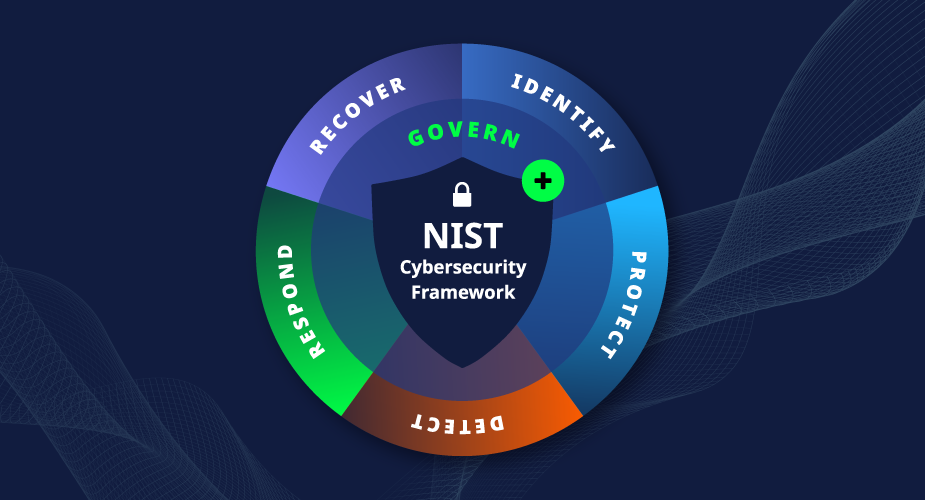
The NIST Cybersecurity Framework (CSF) is a voluntary set of guidelines developed by the US National Institute of Standards and Technology to help organisations of all sizes manage cybersecurity risk. First published in 2014, version 2.0 was released in February 2024 — expanding the framework from five core functions to six with the addition of Govern.
“Voluntary” is the word that causes most small businesses to stop reading. If it’s not required, why pay attention?
Two reasons. First, the CSF has become the de facto reference framework for cyber insurance underwriters, enterprise client security questionnaires, and compliance programmes across regulated industries. Understanding the CSF helps you understand what those questionnaires are actually asking, whether or not the framework is explicitly named. Second, the CSF provides a structured vocabulary for thinking about security that is genuinely useful — not a checklist, but an organising framework that helps prioritise security investment based on risk rather than guesswork.
CSF 2.0’s biggest change from version 1.1 is the addition of the Govern function, which places governance — management oversight, accountability, supply chain risk management, and organisational policy — at the centre of the framework rather than treating it as a background assumption. This reflects the reality that cybersecurity failures are increasingly governance failures before they’re technical ones.
NIST published a Small Business Quick-Start Guide alongside CSF 2.0 (NIST SP 1300), specifically designed for businesses with modest or no existing cybersecurity programmes. This article expands on that guide with practical context and action items.
The Six Functions: The Core of CSF 2.0
CSF 2.0 organises cybersecurity into six Functions, each representing a broad category of cybersecurity outcome. The Functions are not sequential steps — they’re concurrent disciplines that a complete security programme addresses simultaneously.
Think of them as the six questions a well-run security programme answers:
- Govern — How does cybersecurity fit into your overall business management?
- Identify — What do you need to protect?
- Protect — What controls prevent or reduce harm?
- Detect — How do you know when something goes wrong?
- Respond — What do you do when something does go wrong?
- Recover — How do you get back to normal?
The addition of Govern in CSF 2.0 is conceptually significant. It places the accountability, risk tolerance decisions, and supply chain risk management that underpin everything else in a dedicated function — recognising that the biggest security failures typically trace back to governance failures before they become technical ones.
The rest of this guide explains each function in plain terms, with specific actions that make sense for a small business.
Function 1: Govern
What it is
Govern is the newest CSF function and in some ways the most important for small businesses, because it addresses the questions that have to be answered before the technical controls make sense: who is responsible for cybersecurity decisions, what risks is the business willing to accept, and how does cybersecurity align with business objectives?
In an enterprise, Govern covers board-level accountability, Chief Information Security Officer (CISO) authority, security committees, and formal risk management processes. In a small business, it covers much simpler but equally important questions.
What it means for your small business
Accountability: Someone specific is responsible for cybersecurity at your business. Not “IT” as a category — a named person. For most small businesses, this is the owner, the senior operations person, or the IT manager. That person owns security decisions and is accountable when controls fail.
Risk understanding: The business has made conscious decisions about what risks it accepts and what risks it addresses. “We can’t afford a $10,000 EDR solution right now” is a risk acceptance decision — it’s valid if it’s conscious and documented. What’s not valid is not knowing the risk exists.
Policy framework: Documented policies that define how the business handles security exist, are reviewed, and are communicated to employees. This is the information security policy that our companion policy writing article covers.
Supply chain risk: An awareness that the business’s security depends not just on its own controls but on the controls of its vendors, cloud providers, and software tools. A vendor who holds your customer data and gets breached affects your customers just as directly as if you were breached yourself.
Cybersecurity in business planning: Security decisions are considered when making business decisions — adopting a new tool, moving to a new cloud provider, hiring a new contractor with system access. Security isn’t an afterthought addressed after deployment.
Practical starting actions for small businesses
- Name the security owner today, even if it’s the business owner until you can delegate it
- Write a one-page risk summary identifying your three to five highest cybersecurity risks and what you’re doing about each
- Create a vendor inventory listing every service provider with access to your data and noting what you know about their security
- Ensure security is part of your technology decision-making process — when you evaluate a new tool, security review is part of the evaluation
Function 2: Identify
What it is
Identify covers understanding what assets, data, and processes need to be protected — and the risks to them. You cannot protect what you don’t know exists.
What it means for your small business
The Identify function addresses four practical questions:
- What data does your business hold? (Customer records, financial data, employee information, intellectual property)
- What systems, devices, and applications process or store that data?
- What are the most significant threats to that data and those systems?
- What are the consequences if a specific asset or system were compromised?
For a small business, Identify is primarily about creating an honest inventory and a basic risk assessment. Not a 200-page enterprise risk register — a clear-eyed list of what you have, where it is, and what would hurt most if it were lost or compromised.
Practical starting actions for small businesses
- Create an asset inventory: List all devices (computers, laptops, phones, servers, network equipment), software applications, cloud services, and the types of data each holds
- Identify critical assets: Of everything on that list, what three to five things, if they were unavailable for a week, would most harm the business? Those are your critical assets
- Conduct a basic risk assessment: For your critical assets, what are the most plausible threats? Ransomware encrypting your file server. A phishing attack compromising the owner’s email. A vendor breach exposing customer records. Document this.
- Map data flows: Understand where sensitive data moves — from customers into your systems, between systems internally, out to vendors and cloud providers
Function 3: Protect
What it is
Protect covers the controls that prevent or reduce the impact of cyber incidents. This is the most familiar part of cybersecurity for most businesses — the antivirus, the firewall, the MFA — but the CSF frames it as a deliberate programme of controls based on the risks identified in the Identify function, not a random assortment of tools.
What it means for your small business
CSF 2.0 organises Protect into six categories. Here’s how each maps to practical small business controls:
Identity Management and Access Control (PR.AA): Who has access to what, and how is that managed? Minimum necessary access, unique accounts, MFA on all accounts, prompt deprovisioning of departed employees.
Awareness and Training (PR.AT): Do employees know how to recognise and respond to threats? Security awareness training, phishing recognition, incident reporting procedures.
Data Security (PR.DS): How is data protected in storage and transit? Encryption of sensitive data at rest and in transit, data classification and handling procedures, backup.
Platform Security (PR.PS): Are the systems that store and process data configured securely? Secure configuration of devices, software, and cloud services; patch management; removal of unnecessary software.
Technology Infrastructure Resilience (PR.IR): Can your infrastructure withstand disruption and recover? Network segmentation, resilient systems design, backup and recovery capability.
Protective Technology (implicit throughout): The security tools — firewalls, DNS filtering, endpoint protection, email security — that implement the controls above at a technical level.
Practical starting actions for small businesses
- MFA on everything: Every cloud service, every business account, every remote access method — this is the single most impactful access control action
- Endpoint protection: Business-grade antivirus or EDR on every device, centrally managed
- Patch management: All software and operating systems kept current — critical patches within 14 days
- Backup: 3-2-1 backup rule, tested restoration, ransomware-resistant copy
- Firewall and DNS filtering: Network-level protection that covers all devices
- Employee training: Annual security awareness training, documented completion
Function 4: Detect
What it is
Detect covers the activities that identify cybersecurity events when they occur. Prevention controls (Protect) reduce the probability of an incident. Detection controls reduce the time between an incident occurring and you knowing about it. The faster you detect, the faster you contain, and the lower the damage.
What it means for your small business
The Detect function has two components:
Continuous monitoring: Systems and network activity are monitored so anomalies are visible. At the enterprise level, this means a SIEM processing millions of events per day. At the small business level, it means: endpoint protection that generates alerts, email security that flags suspicious messages, audit logs that capture who accessed what when, and ideally a monitoring service (MDR) that watches those alerts and acts on them.
Adverse event analysis: When something is flagged as potentially suspicious, there is a process for assessing it — determining whether it’s a genuine threat or a false alarm, and escalating if it’s the former.
For most small businesses, the honest gap in the Detect function is not the monitoring tools themselves — most businesses with endpoint protection have some alerting capability — but the process for reviewing and acting on alerts. Tools that generate alerts nobody reads don’t provide detection capability.
Practical starting actions for small businesses
- Enable audit logging in your cloud services (Microsoft 365, Google Workspace) and ensure logs are retained for at least 90 days
- Configure endpoint protection alerts to go to a named person who will review them
- Enable login anomaly alerts in your identity provider (unusual login locations, failed login patterns)
- Implement MDR or managed monitoring if nobody at your business actively reviews security alerts — a managed detection service like Huntress provides the human monitoring layer that self-managed tools can’t
- Brief your team on indicators to report: Slow devices, unexpected account lockouts, unusual browser behaviour, unexpected files — employees are often the first to notice something is wrong
Function 5: Respond
What it is
Respond covers what happens when an incident is detected — the immediate response to contain the damage, the communication with stakeholders, the investigation of what happened, and the improvement of controls to prevent recurrence.
What it means for your small business
The Respond function maps to what the security world calls incident response. It has five phases:
Incident management: Confirm the incident is real, establish its scope, and activate the response process. Who is notified? Who leads the response? Who makes the decision to isolate a device, shut down a system, or call external help?
Incident analysis: Understand what happened, how it started, what data or systems are affected, and whether the attacker still has access.
Incident containment: Stop the incident from spreading or causing further damage. Isolate the affected device. Change compromised credentials. Block malicious network connections.
Incident eradication: Remove the threat completely. Eliminate malware, close the entry point, revoke compromised access.
Communications: Notify the right people — internally (leadership, affected teams), externally (regulators within required timeframes, affected individuals, law enforcement if appropriate), and commercial partners who need to know.
Practical starting actions for small businesses
- Write an incident response plan — even a one-page document naming who does what and who to call is vastly better than no plan
- Bookmark the regulatory notification portals for the jurisdictions relevant to you (ICO in the UK, relevant EU DPA, HHS if you handle health data) — you need these within 72 hours for GDPR breaches, not after a search during an incident
- Prepare notification templates for regulatory authorities and affected individuals
- Identify external resources before you need them: a breach response firm or privacy attorney you can call at 2am
- Conduct a tabletop exercise — a 30-minute walkthrough of “ransomware at 2am, what do we do?” reveals more about your response readiness than any documentation review
Function 6: Recover
What it is
Recover covers restoring systems, services, and operations to normal after an incident, and incorporating the lessons learned into the security programme to prevent recurrence or reduce the impact of future incidents.
What it means for your small business
Recovery from a cyber incident involves two distinct timelines:
Technical recovery: Restoring systems and data from backup, rebuilding compromised systems, verifying that the threat has been fully eradicated before reconnecting systems to the network. The key metric here is Recovery Time Objective (RTO) — how long can the business tolerate downtime before it causes serious operational or financial harm? And Recovery Point Objective (RPO) — how much data can the business afford to lose (how old can the most recent clean backup be)?
Business continuity: Operating the business while systems are being restored. For a very small business, this may mean reverting to paper-based processes temporarily. For a larger business, it means having pre-defined procedures for operating without specific systems.
Post-incident improvement: What did the incident reveal about weaknesses in your security programme? The Recover function includes the lessons-learned process that feeds back into Govern and Protect — tightening controls, updating policies, addressing the root causes that allowed the incident to occur.
Practical starting actions for small businesses
- Define your RTO and RPO — how long can you be down, and how old can your data be? Then verify your backup strategy actually meets those targets
- Document business continuity procedures for your most critical functions: “If our systems are unavailable for three days, how do we process orders, communicate with customers, and pay staff?”
- Test backup restoration annually and confirm the RTO you actually achieve matches your target
- Conduct a post-incident review after any significant security event, even a minor one — what happened, why, and what would have prevented it or reduced the impact?
The Six Functions in Practice: How They Connect
The CSF functions are not a sequence — you don’t complete Govern before starting Identify, finish Identify before starting Protect, and so on. They operate simultaneously, reinforcing each other.
The feedback loops are what make the framework durable:
- Identify feeds Protect — you protect what you’ve identified as critical
- Detect feeds Respond — you respond to what detection surfaces
- Respond and Recover feed Govern and Identify — incident learnings update your risk assessment and governance decisions
- Govern frames everything else — the risk tolerance and accountability decisions made in Govern determine how much investment Protect receives and how Detect and Respond are resourced
For a small business starting from scratch, the practical implementation sequence is:
Month 1: Govern and Identify
- Name the security owner
- Create asset inventory
- Write a basic risk assessment
- Start a vendor inventory
Months 2–3: Protect foundations
- MFA on everything
- Endpoint protection deployed
- Backup verified and tested
- Patch management formalised
Month 4: Detect capability
- Audit logging enabled
- Alert routing to named person (or MDR)
- Employee incident reporting process established
Month 5: Respond readiness
- Incident response plan written
- Tabletop exercise conducted
- Notification resources identified
Month 6+: Recover and continuous improvement
- RTO/RPO verified against backup capability
- Business continuity procedures documented
- Annual review cycle established
How CSF 2.0 Relates to Other Frameworks and Standards
A question small businesses frequently ask: “Does using NIST CSF mean I comply with GDPR, HIPAA, ISO 27001, or Cyber Essentials?”
The answer is no — NIST CSF is a risk management framework, not a compliance framework for any specific regulation. But it serves as a useful organisational backbone for multiple compliance programmes simultaneously:
GDPR: GDPR’s Article 32 requirement for “appropriate technical and organisational measures” maps closely to the CSF’s Protect function. The risk assessment requirement of Article 32 maps to Identify. The incident response and breach notification requirements map to Respond. Using the CSF as your security programme’s structure doesn’t satisfy GDPR compliance, but it provides a solid technical foundation for it.
HIPAA: HIPAA’s Security Rule’s administrative, physical, and technical safeguards map to CSF’s Govern, Protect, and Detect functions. A Security Risk Analysis (HIPAA’s most frequently cited requirement) is essentially the Identify function in HIPAA terms.
ISO 27001: ISO 27001 requires a more formal ISMS (Information Security Management System) with documented risk management processes, internal audits, and management reviews. The CSF’s Govern function overlaps significantly with ISO 27001’s management system requirements. A business using CSF has a meaningful head start on ISO 27001, but the formal management system requirements add significant additional structure.
NIST SP 800-53 / CMMC: US government contractors using CSF as a baseline find it maps well to the more prescriptive NIST SP 800-53 control catalogue and the Cybersecurity Maturity Model Certification (CMMC) requirements.
Cyber Essentials (UK): The five technical controls of Cyber Essentials (firewalls, secure configuration, access control, malware protection, patch management) map primarily to CSF’s Protect function. Cyber Essentials is a narrower, more prescriptive standard; CSF is broader and more flexible. Using CSF doesn’t satisfy Cyber Essentials certification, but implementing CSF Protect covers more than the Cyber Essentials controls.
CSF 2.0 Quick-Start Checklist for Small Businesses
This checklist maps to NIST’s official Small Business Quick-Start Guide (SP 1300) with additional practical context.
Govern
- ☐ Named person is responsible for cybersecurity at the business
- ☐ Written information security policy exists and has been reviewed in the past 12 months
- ☐ Cybersecurity risks are reviewed at management level at least annually
- ☐ New technology decisions include a security assessment step
- ☐ Vendor inventory exists listing services with access to business data
Identify
- ☐ Asset inventory of all devices, applications, and cloud services exists
- ☐ Critical assets and data are identified
- ☐ Basic risk assessment documents top threats and vulnerabilities
- ☐ Data flows are understood — where sensitive data goes in, within, and out of the business
- ☐ Roles and responsibilities for security are defined
Protect
- ☐ MFA is enforced on all business accounts
- ☐ Unique accounts for every user — no shared credentials
- ☐ Access reviews conducted at least annually; departures actioned within 24 hours
- ☐ Business-grade endpoint protection on all devices, centrally managed
- ☐ All operating systems and applications are patched and current
- ☐ Full-disk encryption on all laptops and mobile devices
- ☐ Business-grade firewall protecting the network boundary
- ☐ DNS filtering in place for all network-connected devices
- ☐ Daily backup with off-network/off-site copy; restoration tested
- ☐ Microsoft 365 or Google Workspace backed up by third-party tool
- ☐ Annual security awareness training for all employees, completion documented
- ☐ Email security (SPF, DKIM, DMARC) configured correctly
Detect
- ☐ Audit logging enabled in cloud services and retained for at least 90 days
- ☐ Endpoint protection alerts routed to a named person who reviews them
- ☐ Login anomaly alerts configured (unusual location, repeated failures)
- ☐ Employees know how to report a suspected security incident
- ☐ Security events are reviewed regularly (MDR if no internal monitoring capability)
Respond
- ☐ Written incident response plan exists, is current, and has a named owner
- ☐ Incident response plan has been tested (tabletop exercise at minimum)
- ☐ Regulatory notification portals bookmarked for relevant jurisdictions
- ☐ Breach notification templates prepared in advance
- ☐ External incident response resources (attorney, breach coach) identified
- ☐ Cyber insurance hotline number is in the incident response plan
Recover
- ☐ RTO (Recovery Time Objective) and RPO (Recovery Point Objective) are defined
- ☐ Backup restoration testing confirms RTO target is achievable
- ☐ Business continuity procedures documented for critical functions
- ☐ Post-incident review process defined for lessons learned
- ☐ Security controls updated based on incidents and near-misses
Tiers: Where Does Your Business Currently Sit?
CSF 2.0 describes four Tiers that characterise how mature an organisation’s cybersecurity risk management is. They’re not compliance levels — they’re a way of honestly describing your current state and your trajectory.
Tier 1 — Partial: Cybersecurity risk management is ad hoc, reactive, and largely undocumented. There may be some security tools in place, but no systematic programme. Security decisions are made individually rather than as part of a deliberate programme. Most small businesses starting their security journey are here.
Tier 2 — Risk Informed: Risk management practices are approved by management and exist as written policy, but may not be consistently applied across the organisation. The business is aware of cybersecurity risk and makes deliberate (if incomplete) decisions about it. Security practices are more consistent than Tier 1 but not yet fully integrated into business operations.
Tier 3 — Repeatable: Formal policies and processes are in place, regularly updated, and consistently applied. The organisation can demonstrate repeatable security practices. Security is integrated into business processes and supply chain management. This is the appropriate target for most small businesses with any significant security obligation.
Tier 4 — Adaptive: The organisation actively adapts security practices based on lessons from previous incidents, current threat intelligence, and proactive risk assessment. Cybersecurity practices are continuously improved. This tier is relevant for organisations with more sophisticated security needs or in higher-risk sectors.
Most small businesses should aim for Tier 2 in their first year of structured security and Tier 3 over 18–24 months. Being honest about your current tier is more useful than claiming a higher tier without the evidence to support it.
What to Avoid
Don’t treat the CSF as a compliance checklist. The most common misuse of the NIST Cybersecurity Framework — in any size organisation — is turning it into a tick-box exercise. The CSF is an outcomes framework, not a control list. The question it asks is not “do you have a firewall?” but “does your network boundary protect your critical assets from the threats most relevant to your risk profile?” The answer to the second question requires understanding your actual risks. The answer to the first one is just an inventory item.
Don’t start with all six functions simultaneously at full depth. For a business beginning its security programme, trying to address all six functions in detail from day one leads to paralysis. Start with the governance decisions in Govern (who’s responsible, what are the top risks), the asset identification in Identify (what needs protecting), and the highest-priority protection controls in Protect (MFA, backup, endpoint protection, patching). Build outward from there.
Don’t confuse voluntary with optional. The CSF is voluntary in the sense that no single law mandates it for all businesses. It is not optional in the sense that the risks it addresses are optional. Ransomware, phishing, credential theft, and data breaches are mandatory facts of operating a business that handles data in 2026. The CSF provides a structured way to address those risks; ignoring it doesn’t make the risks smaller.
Final Verdict
The NIST Cybersecurity Framework 2.0 is the most useful security framework available to small businesses in 2026 — not because it’s the most prescriptive, but because it’s the most adaptable. It scales from a five-person business with no formal security programme to a 10,000-person enterprise with a dedicated security operations centre.
For a small business, the practical value of CSF 2.0 is in the vocabulary and structure it provides:
- Govern prevents security from being nobody’s job
- Identify prevents security from being applied to the wrong things
- Protect converts risk awareness into actual controls
- Detect ensures controls are monitored rather than assumed
- Respond ensures there’s a plan for when prevention fails
- Recover ensures the business can return to normal after an incident
Start with Govern and Identify. Name who is responsible and document what needs protecting. Everything else follows from those decisions being made consciously and deliberately.
The official NIST Small Business Quick-Start Guide (NIST SP 1300, free to download from nist.gov) is the companion document to this article. It’s eight pages and requires no security background to read. It’s the appropriate starting point for any small business that wants to use the CSF as the structure for its security programme.
Frequently Asked Questions
What is the difference between CSF 1.1 and CSF 2.0?
NIST CSF 2.0 (February 2024) introduced three main changes from CSF 1.1. First, a sixth Core Function — Govern — was added alongside the original five (Identify, Protect, Detect, Respond, Recover). Govern places cybersecurity governance, accountability, risk management, and supply chain risk at the centre of the framework. Second, the scope was expanded beyond critical infrastructure to explicitly include organisations of all sizes and sectors. Third, new resources and quick-start guides were developed, including a specific Small Business Quick-Start Guide (NIST SP 1300). The five original functions’ content was also updated to reflect current threats and practices.
Is the NIST Cybersecurity Framework required for small businesses?
No — the CSF is voluntary for most organisations. However, it has become a de facto reference standard in several contexts that do affect small businesses: cyber insurance applications frequently reference CSF-aligned controls, enterprise clients’ security questionnaires often map to CSF functions, and US government contractors may face CSF-related requirements through their contracts. Understanding the CSF helps a small business understand what security questionnaires and compliance frameworks are actually asking, even when the CSF isn’t explicitly named.
How long does it take to implement the NIST Cybersecurity Framework for a small business?
Implementing a basic CSF-aligned security programme — covering all six functions at a Tier 2 level — typically takes 3–6 months for a small business starting from minimal controls. Getting the foundational Protect controls in place (MFA, endpoint protection, backup, patching, training) can be done in 30–60 days. Building the Identify and Govern structure (asset inventory, risk assessment, written policy, named owner) takes another 30–60 days. Detect and Respond readiness (monitoring, incident response plan, tabletop exercise) adds another 30–60 days. Reaching Tier 3 — with consistent, documented practices applied across the organisation — typically takes 12–18 months from scratch.
Does implementing the NIST CSF make my business GDPR or HIPAA compliant?
Not automatically, but significantly helps. The NIST CSF is a risk management framework, not a compliance framework for any specific regulation. Implementing the CSF provides a security programme foundation that satisfies many technical requirements of GDPR (Article 32 security measures), HIPAA (technical safeguards, Security Risk Analysis), and other frameworks — but the specific documentation, legal basis, rights management, and other requirements of those regulations require additional framework-specific work. Think of CSF as building the security infrastructure; GDPR, HIPAA, and similar regulations add specific legal obligations on top of that infrastructure.
Where can I find the official NIST resources for small businesses?
The NIST Cybersecurity Framework 2.0 is freely available at nist.gov/cyberframework. The Small Business Quick-Start Guide (NIST SP 1300) is a free eight-page PDF available at nist.gov/publications. NIST also maintains a dedicated Small Business Cybersecurity resource page at nist.gov/itl/smallbusinesscyber, with practical tools, videos, and implementation guides designed specifically for organisations without dedicated security staff.
The NIST Cybersecurity Framework 2.0 is published by the US National Institute of Standards and Technology and is freely available at nist.gov/cyberframework. The NIST Small Business Quick-Start Guide (NIST SP 1300) is available at nist.gov/publications. For CISA’s small business cybersecurity resources that align with NIST CSF, see cisa.gov/resources-tools/resources/small-business-resources.
Related reading on SmallBiz Defense: