This article provides general educational information about phishing attack types and does not constitute professional cybersecurity advice. If your organisation has experienced a phishing attack resulting in financial loss or credential compromise, contact your IT provider and report to the FBI’s Internet Crime Complaint Center at ic3.gov.
Three Words, Three Very Different Threats
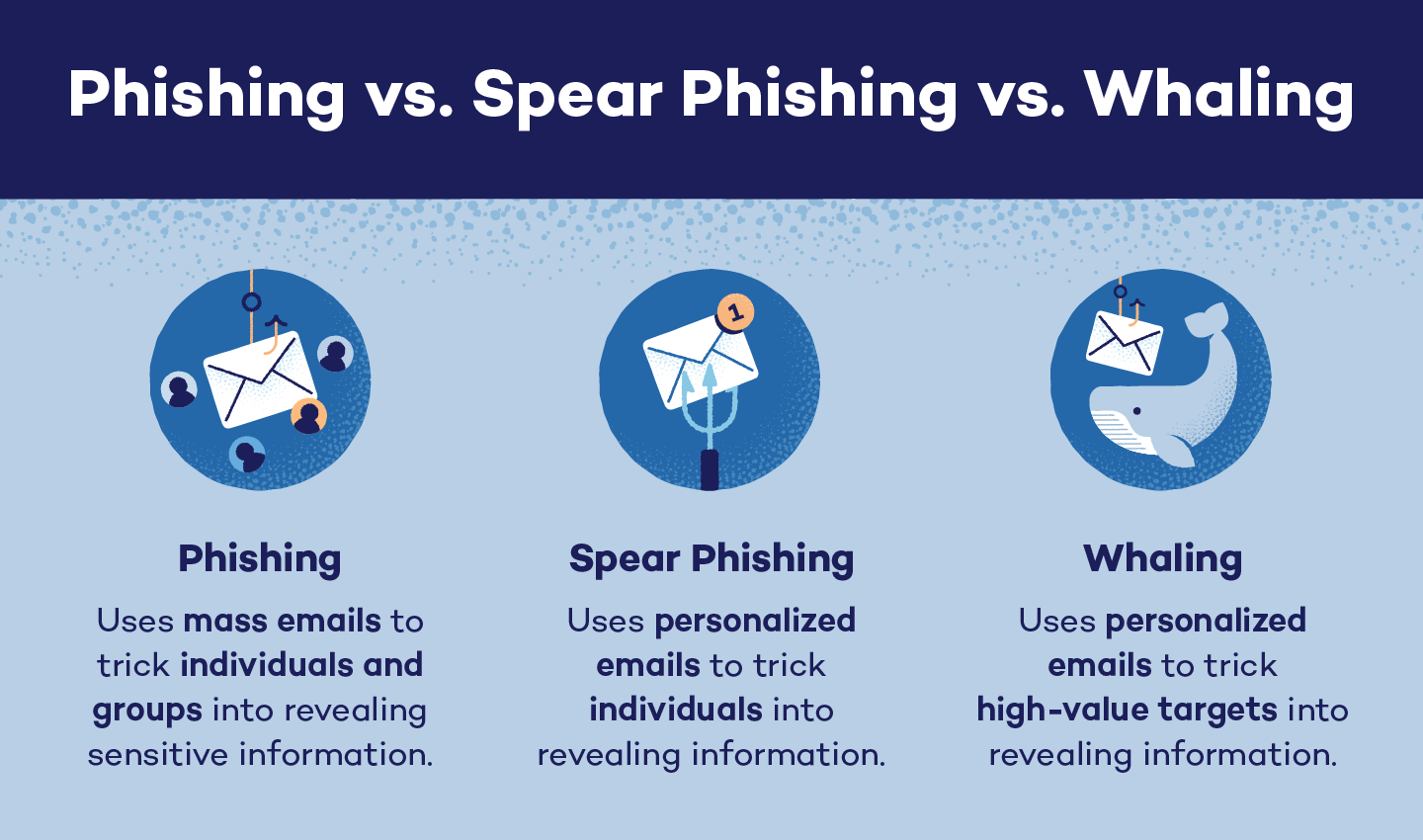
Phishing. Spear phishing. Whaling. You’ve probably seen all three terms — sometimes used interchangeably, which is a mistake. They describe the same delivery mechanism (email, and increasingly text and voice) but three fundamentally different approaches to targeting, effort, and goal.
Understanding the differences matters for two reasons. First, the defences are partially different — a control that stops mass phishing has limited effect against a targeted spear phishing campaign. Second, the risk profile is different — a small business is far more likely to be hit by spear phishing than by whaling, and knowing which threat you’re actually facing shapes where you spend your limited security budget.
This guide defines each term clearly, explains how each attack actually works, covers the related attack types that have emerged alongside them, and lays out the specific defences each one requires.
Phishing: The Net Cast Wide
What It Is
Phishing is the original and broadest category. The name comes from the fishing analogy: cast a wide net, see what you catch. A phishing campaign sends a large volume of deceptive emails — typically thousands to millions of messages — to recipients chosen for availability rather than for anything specific about them.
The goal of a phishing email is to get the recipient to take one of a small number of actions: click a link and enter credentials on a fake login page, open a malicious attachment that installs malware, or in some cases reply with sensitive information. The specifics of the request are designed to appeal broadly — impersonating a widely used service like Microsoft, Google, a major bank, PayPal, or a delivery company creates the best ratio of plausible recipients to total messages sent.
How It Works in Practice
A mass phishing campaign starts with a decision about what to impersonate. The most effective impersonations in 2025 continue to be Microsoft (given the ubiquity of Microsoft 365), Google (Gmail and Google Workspace), and financial institutions. The attacker builds a convincing replica of a legitimate service’s login page, purchases a domain that resembles the real one (microsoft-account-verify.com, rather than microsoft.com), and crafts an email that creates urgency (“Your account will be suspended in 24 hours — verify now”).
The email list may be purchased from dark web markets (lists of email addresses from previous data breaches), gathered by automated scraping of public websites, or simply generated from common name-format patterns against known company domains. Deliverability and volume matter more than personalisation — the message is identical for every recipient.
The attacker expects a low success rate — 1–3% of recipients clicking is often sufficient for a profitable campaign at scale — and relies entirely on volume to make up for the lack of targeting.
The Numbers
Mass phishing is the most common form of email attack by volume. APWG logged approximately 3.8 million phishing attacks in 2025. Over 55% of phishing sites impersonate popular brands — the top impersonated brands are consistently Microsoft, Google, and major financial institutions.
Untrained employees click phishing links at an average rate of around 33% in simulation studies. Organisations with ongoing, consistent security awareness training reduce this to around 4% — an 8x improvement that represents one of the clearest returns on any security investment.
What Phishing Is Not
Mass phishing is indiscriminate. The attacker does not know who you are, doesn’t know what bank you use, and doesn’t know your name before sending. The email may contain your name if it was included in the breached list the attacker purchased, but it wasn’t researched — it was collected.
This distinguishes mass phishing from the two more targeted attack types below.
Spear Phishing: The Targeted Strike
What It Is
Spear phishing is phishing that is targeted at a specific individual or a specific organisation. The attacker has done research before sending — they know who they’re targeting, something about the target’s context and relationships, and how to make the message credible to that specific person.
The research investment makes spear phishing significantly more effective and more expensive to execute than mass phishing. The tradeoff is deliberate: the attacker narrows their target list but dramatically increases the probability of success per message sent. Studies consistently show that targeted phishing achieves click rates of 50% or higher, compared with 1–3% for mass campaigns.
How It Works in Practice
A spear phishing attack against a small business typically begins with open-source intelligence gathering: the attacker reviews your company website, LinkedIn profiles of your staff, any press coverage or social media presence, public filings, and any other available information. From this they build a picture of your organisation structure, your key staff and their roles, your primary vendors and partners, and the kind of communication your staff would expect to receive.
The email is then crafted to fit that specific context. Instead of “your Microsoft account has been suspended,” it might be: “Hi [name] — following up on the proposal we discussed at [real industry event the target attended]. Please review the updated terms in the attached document before our call Thursday.” Or: “Hi [name] — accounts payable asked me to forward this invoice for your approval. [Name of real supplier] is requesting a revised payment method.”
Every detail — the sender’s name, the referenced vendor, the event mentioned, the language style — is chosen to match the target’s expected reality. The message passes the quick plausibility check most people apply to incoming email.
Why Small Businesses Are Disproportionately Targeted
Research consistently shows that small businesses are targeted by spear phishing at higher rates than their size would suggest. One analysis found small businesses three times more likely to be targeted by spear phishing than larger enterprises.
The reasons are practical. Large enterprises have formal email authentication, security awareness training programmes, and technical controls specifically designed to catch targeted attacks. Small businesses typically have fewer of these. The effort required to research and spear-phish a small business is lower (less public information to parse, simpler organisational structure), and the likelihood of success is higher.
The most common spear phishing scenarios targeting small businesses:
Vendor impersonation. The attacker identifies a supplier your business works with (from LinkedIn, your website’s “our partners” page, or public records) and sends a message impersonating that vendor — requesting a payment, asking you to log in to a portal, or asking you to review a document.
Internal impersonation. The attacker identifies the owner or a senior manager and sends email appearing to come from them to other staff — most commonly finance or HR staff who have the ability to transfer money or change payroll details.
IT support impersonation. The attacker impersonates your IT provider and requests credentials, remote access, or asks you to install a tool “for a security update.” This is particularly effective because employees expect IT requests and are conditioned to comply with them quickly.
Delivery and logistics phishing. For businesses that regularly receive shipments, email impersonating courier services (DHL, FedEx, UPS) with a “your package requires action” message that leads to a credential-harvesting page is a high-volume, moderately targeted approach.
AI Makes Spear Phishing Dramatically Cheaper
Historically, spear phishing was resource-intensive. Researching a target, crafting a convincing personalised message, and managing individualised follow-up took time — limiting the number of targets an attacker could pursue.
AI has fundamentally changed this. An AI tool can aggregate publicly available information about a target, generate a convincing personalised message, and adapt tone and style to match available samples — in minutes. IBM research found that AI reduces the time to produce a convincing phishing email from approximately 16 hours to approximately 5 minutes. A Harvard Kennedy School study found that fully AI-automated phishing emails achieved the same 54% click-through rate as human-expert-written emails.
The practical effect: the economics of spear phishing have shifted. What previously required a skilled attacker spending significant time per target is now achievable at near-mass-phishing scale. Attackers can personalise thousands of messages per day, targeting small businesses that would previously have been unprofitable to spear-phish.
Whaling: The CEO in the Crosshairs
What It Is
Whaling is spear phishing targeting the most senior executives in an organisation — CEOs, CFOs, board members, and others at the top of the hierarchy. The term follows the fishing metaphor: if spear phishing is targeting specific fish, whaling is going after the biggest ones.
There are two distinct uses of the term in the security industry, and it’s worth distinguishing them:
Whaling targeting executives as victims. The attacker researches and targets a specific senior executive to steal their credentials, compromise their email account, or install malware through a targeted email. The executive is the victim. The goal is access to high-value information, privileged system access, or the ability to impersonate the executive in follow-on attacks.
Whaling targeting executives as tools. The attacker impersonates a senior executive to trick others in the organisation into taking action — transferring funds, disclosing data, or providing access. In this usage, the executive’s identity is the weapon, not the target. This overlaps significantly with CEO fraud (one of the Business Email Compromise variants covered in a separate article) and is sometimes called reverse whaling.
In practice, both forms occur. An attacker may compromise a CEO’s email account (executive as victim) and then use that account to perpetrate fraud against finance staff (executive’s identity as weapon) — the two forms combine in the most sophisticated attacks.
How It Works in Practice
Whaling attacks are the most heavily researched of all phishing variants. The attacker may spend weeks gathering intelligence before making any contact: reviewing the executive’s public statements, conference appearances, regulatory filings, social media, news coverage, and any information about the company’s current strategic priorities.
The attack itself is typically not a generic “your account has been suspended” message. It’s a highly specific, contextually relevant email that only makes sense given detailed knowledge of the target’s current situation. An email referencing a real acquisition the executive is known to be evaluating, or a regulatory matter that is publicly known, or a relationship with a specific board member — these details make the message credible in a way that generic phishing never achieves.
Whaling attacks also commonly extend beyond email. Voice phishing calls (vishing) impersonating law firms, regulatory bodies, or other executives are increasingly part of the whaling toolkit. AI voice cloning has made voice-based whaling attacks significantly more convincing — an attacker with a few seconds of audio from a public appearance can generate convincing audio in the target’s colleague’s or direct report’s voice.
Why Whaling Is a Small Business Concern
In a small business, the CEO, owner, or managing director is often also the person who approves wire transfers, manages banking relationships, and handles sensitive business matters directly. This concentration of authority makes whaling against small business leaders particularly high-value for attackers.
The attacker who successfully compromises a small business owner’s email account gains access to banking correspondence, vendor relationships, legal communications, and the authority to impersonate someone whose instructions other staff will not question. The average small business has fewer internal controls between a fraudulent executive instruction and an irreversible financial action.
Related Attack Types: Smishing, Vishing, and Angling
Phishing, spear phishing, and whaling primarily describe email-based attacks. Three related attack types extend the same approach to other channels.
Smishing (SMS Phishing)
Smishing is phishing via text message. The mechanics are identical to email phishing — a deceptive message designed to get the recipient to click a malicious link or take a specific action — but delivered by SMS.
Smishing is increasingly common for two reasons. SMS messages have significantly higher open rates than email (close to 98%, compared with around 20% for email), and SMS lacks the filtering infrastructure that exists for email — there is no equivalent of SPF, DKIM, or DMARC for text messages.
Common smishing scenarios: delivery notification messages requesting a customs fee or delivery confirmation; bank fraud alerts requesting account verification; two-factor authentication code interception attempts; and impersonation of government agencies (HMRC, IRS, SSA) requesting urgent action.
For small business owners, smishing targeting mobile devices is a meaningful risk. Business decisions are increasingly made via mobile, and mobile devices often have less security tooling than desktop environments.
Vishing (Voice Phishing)
Vishing is phishing via phone call. The attacker calls the target impersonating a trusted entity — IT support, a bank’s fraud department, a government agency, or a colleague — and attempts to extract credentials, sensitive information, or authorisation for financial action.
Vishing has become significantly more dangerous with AI voice cloning. An attacker who has gathered audio of a specific person (from a public video, earnings call, or social media) can generate convincing audio in that person’s voice and use it in calls or voicemails. The FBI reported over $30 million in BEC losses with a confirmed AI nexus in 2025, a significant portion of which involved voice cloning.
For small businesses, vishing targeting the owner or a financial staff member — impersonating their bank, their IT provider, or a senior colleague — is a meaningful and growing risk. Establish a policy that no financial authorisation can be completed based solely on a phone call without a verification step using a separately established contact.
Angling (Social Media Phishing)
Angling is phishing conducted through social media platforms, where attackers create fake customer service accounts or respond to public complaints to redirect users to fraudulent websites or extract credentials.
A common scenario: a business owner posts on social media that they’re having trouble with their bank or a software product. A fake “support” account responds quickly, offers help, and directs them to a website requesting login credentials or a callback number that routes to the attacker.
For small businesses with an active social media presence, angling is a relevant risk — particularly because the attacker exploits a real public statement the target made, making the interaction feel contextually relevant rather than random.
Side-by-Side Comparison
| Mass phishing | Spear phishing | Whaling | |
|---|---|---|---|
| Targeting | Indiscriminate | Specific individual or org | Senior executives |
| Research required | None | Hours to days | Days to weeks |
| Volume per campaign | Thousands to millions | Dozens to hundreds | One to a handful |
| Personalisation | None | Moderate to high | Very high |
| Typical goal | Credential theft, malware delivery | Credential theft, fraud, data theft | Account compromise, high-value fraud |
| Typical success rate | 1–3% click rate | 30–50%+ click rate | Varies; often very high |
| Who handles it | Opportunistic criminals, botnets | Skilled attackers, cybercrime groups | Nation-states, sophisticated criminal groups |
| Primary small biz risk | Low (volume-based, less targeted) | High (most common targeted attack) | Moderate (targets owners directly) |
| AI impact | Moderate (scale, better copy) | Very high (scales personalisation) | High (voice cloning, deeper research) |
How Defences Differ by Attack Type
The defences for mass phishing and targeted spear phishing/whaling are not the same, which is why security programmes need to address both.
Defences That Work Against Mass Phishing
Email filtering and anti-spam tools. Mass phishing relies on volume and uses known techniques — link obfuscation, known malicious domains, attachment types — that email security tools are designed to detect. A good email gateway (Microsoft Defender for Office 365, Google Workspace’s built-in protection, Proofpoint Essentials) blocks a large proportion of mass phishing before it reaches inboxes.
DNS filtering. Blocking connections to known malicious domains at the DNS level prevents the credential-harvesting pages that mass phishing points to from loading, even if an employee clicks the link.
Security awareness training. Training employees to recognise the generic signals of phishing — urgency, mismatched sender addresses, unexpected requests — reduces click rates significantly. Studies show ongoing training cuts click rates from ~33% to ~4%.
MFA on all accounts. Even when an employee falls for a mass phishing attack and enters their credentials on a fake page, MFA prevents the attacker from using those credentials to log in.
Defences That Work Against Spear Phishing and Whaling
The defences above all still apply — but they’re necessary rather than sufficient for targeted attacks. Spear phishing is specifically designed to bypass standard filters and pass the quick plausibility check that training teaches. Additional defences:
BEC-specific email security. Spear phishing targeting financial staff overlaps with Business Email Compromise. Email security tools that use behavioural analysis and natural language processing to flag anomalous financial requests and domain lookalike detection catch targeted attacks that standard filters miss. Microsoft Defender for Office 365 Plan 2, Proofpoint, Abnormal Security, and similar tools provide this.
Targeted training on spear phishing scenarios. General phishing training focuses on generic signals. Targeted training walks staff through realistic spear phishing scenarios specific to their role — what a convincing vendor impersonation email looks like for an accounts payable processor, what a convincing internal impersonation looks like for an HR staff member. This role-specific training significantly outperforms generic awareness training for spear phishing defence.
Out-of-band verification for financial actions. The most important procedural control: any wire transfer above a defined threshold, and any change to banking or payment details, requires a phone call to a known, previously verified number before it’s processed. This is the control that stops spear phishing cold even when the email itself is perfectly convincing — because the verification step happens outside email entirely.
DMARC at enforcement. DMARC set to p=reject prevents attackers from spoofing your exact domain in emails targeting your staff or your customers. It doesn’t prevent lookalike domain attacks (yourcompany-inc.com), but it eliminates the easiest impersonation vector.
Privileged account protection. Executives and staff with financial authority should use FIDO2 hardware security keys for authentication where available. FIDO2 keys are phishing-resistant by design — they cryptographically verify the site you’re logging into and will not provide authentication credentials to a fake login page, even one that is pixel-perfect.
Separate verification channel for voice. Because AI voice cloning makes phone calls an unreliable verification mechanism, establish a code word or out-of-band text confirmation process for financial authorisation. No money moves based solely on a phone or video call.
Red Flags for Each Attack Type
Mass Phishing Red Flags
- Email comes from a generic or free domain impersonating a brand (microsoft-security@gmail.com)
- Urgent language: “Act immediately,” “Your account will be locked,” “Verify now”
- Greeting is generic: “Dear customer,” “Dear user,” rather than your name
- The link URL doesn’t match the company it claims to be from (hover before clicking)
- Unexpected attachment with a common file type (PDF, Word, ZIP) from a company you have a routine relationship with
- Grammar or spelling errors — still present in non-AI-generated mass phishing
Spear Phishing Red Flags
- Email uses your name, your company name, or references a real relationship or recent event accurately — but the request still feels off
- The sender address uses a domain that looks right at a glance but has a subtle difference (extra character, hyphen, different TLD)
- A vendor you work with is requesting a change to payment details or banking information by email
- An email from a colleague or manager requests financial action or sensitive data, and the request feels unusual for that person
- The email explicitly asks you to act quickly and not to involve others
- An attachment or link is included in an email where you wouldn’t normally expect one
Whaling Red Flags (for executives themselves)
- An email referencing confidential business information that appears to come from a law firm, regulatory body, or investor — but the sender address is slightly off
- An urgent request from someone claiming to be a board member, auditor, or regulator, received outside normal communication channels
- A phone call from someone claiming to be a colleague, investor, or lawyer requesting urgent action — where the voice sounds right but the request is unusual
- A video call where participants’ lip movement seems slightly delayed or unnatural
- Any request that bypasses normal procedures and asks for immediate action before you can verify with your normal contacts
Final Verdict
Phishing, spear phishing, and whaling sit on a spectrum from low-effort-high-volume to high-effort-high-value. For small businesses, the most relevant threat is spear phishing — targeted, researched, personalised attacks that are specifically designed to look legitimate to the individual receiving them. Whaling is relevant for business owners who are the primary decision-makers and financial authorities in their companies.
The defences that matter: MFA on all accounts (stops credential theft even when phishing succeeds), out-of-band verification for financial actions (stops BEC regardless of how convincing the email is), DMARC at enforcement (removes the easiest impersonation vector), role-specific training for staff who handle money or sensitive data, and email security tools with BEC detection capabilities for targeted attack variants.
Mass phishing is largely handled by email filtering and basic training. Spear phishing and whaling require the procedural controls — the verification steps and the policies — that operate independently of whether the email itself looks legitimate.
Frequently Asked Questions
Is smishing more dangerous than email phishing?
Not inherently more dangerous, but in some ways harder to defend against. SMS lacks the filtering infrastructure that exists for email — there is no spam filter or malware scanner standing between a text message and the recipient. Open rates for SMS are significantly higher than for email, meaning more people see smishing messages. The defences (scepticism, verification, not clicking unexpected links) are the same — but the technical barriers are lower, so more reliance falls on human awareness. For business purposes, apply the same scepticism to unexpected text messages that you would to unexpected emails.
Can spear phishing bypass MFA?
Yes — through a technique called adversary-in-the-middle (AiTM) phishing or real-time phishing proxies. Instead of directing victims to a static fake page that captures credentials, AiTM attacks proxy the victim’s session through the attacker’s infrastructure in real time, capturing both credentials and session tokens (including MFA tokens) as they’re used. This allows attackers to bypass standard MFA methods like authenticator app codes and SMS codes. FIDO2 hardware security keys are resistant to this attack because they cryptographically verify the site’s identity — they will not complete authentication against a proxied fake page. For high-risk accounts, FIDO2 keys are the appropriate MFA method.
How do I know if a spear phishing email is targeting my company specifically?
Several signals suggest a targeted attack rather than mass phishing: the email uses your actual name, company name, colleague names, or specific details about your business relationships; the sender domain closely resembles a vendor or partner you work with rather than a generic brand; the request is contextually plausible (referencing a real supplier, a real project, a real relationship) rather than generic; and the email doesn’t contain the obvious signals (bad grammar, generic greeting, mismatched major brand) that standard phishing training teaches people to spot. If you receive an email that feels oddly specific and accurate about your business, treat it with heightened scepticism rather than less.
Should I click a phishing simulation to see what happens?
Phishing simulations are safe to click — they are controlled training exercises that record your response and deliver a training moment, not actual attacks. However, in the real world, clicking on suspected phishing links before verification is always the wrong approach. Even a page that looks completely legitimate can be capturing your credentials or triggering a drive-by download in the background. The correct response to a suspicious email is to report it through your organisation’s reporting mechanism, not to investigate it yourself by clicking.
What is the difference between phishing and social engineering?
Social engineering is the broader category: any technique that manipulates human psychology to extract information, access, or actions. Phishing is one form of social engineering — the specific application of manipulation via electronic messaging (email, SMS, social media). Other social engineering techniques include vishing (phone-based), pretexting (fabricating a scenario to gain trust over time), baiting (leaving infected USB drives in accessible locations), and tailgating (following an authorised person into a restricted physical area). Phishing is the most common and most scalable form of social engineering, but it’s one tactic within a broader set of techniques that all exploit human trust rather than technical vulnerabilities.
This article provides general educational information and does not constitute professional cybersecurity advice. For US government guidance on phishing and email security for small businesses, see CISA’s Small Business Cybersecurity Resources.
Related reading on SmallBiz Defense:
2 thoughts on “Phishing vs Spear Phishing vs Whaling: Key Differences 2026”