This article provides general educational information about supply chain cybersecurity risks and does not constitute professional cybersecurity or legal advice. If your business has experienced a breach originating from a third-party vendor or software provider, contact your IT provider immediately and report to the FBI’s Internet Crime Complaint Center at ic3.gov.
The Attack That Starts Someone Else’s Business
In January 2025, attackers used a single stolen credential to access a vendor support portal. That one credential — at a company most people had never heard of — exposed data on 62.4 million students and 9.5 million teachers across more than 6,500 school districts. The vendor was PowerSchool, a widely used education software platform. The support portal it used to help customers had no multi-factor authentication.
This is a supply chain attack. The victims — thousands of schools — did nothing wrong. Their systems weren’t breached. Their staff didn’t click a phishing link. They were compromised through a tool they trusted and paid for, via a weakness in their vendor’s infrastructure that they had no way to audit or control.
Supply chain attacks don’t target you directly. They target the software you rely on, the vendors you pay, and the tools your staff use every day. And in 2025, they accounted for 30% of all data breach incidents tracked by Verizon — up from 15% the year before. Verizon called it the largest single-year shift ever recorded in their data.
This guide explains what supply chain attacks are, why they’ve become the fastest-growing attack category, what the most important real-world examples tell us about how they work, and — critically — what a small business can actually do about a threat that originates outside its own perimeter.
What Is a Supply Chain Attack?
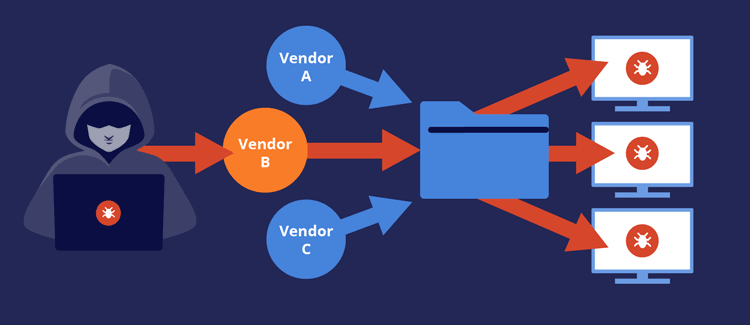
A supply chain attack is any attack where a threat actor compromises a target indirectly, by first compromising a vendor, software provider, or other third party that the target trusts and connects to.
The term “supply chain” comes from the manufacturing world, where it describes the network of suppliers, manufacturers, and distributors that bring a product to market. In cybersecurity, the supply chain is the network of software, services, and vendors that your business depends on — and an attacker who compromises any link in that chain can potentially reach every organisation connected to it.
This is what makes supply chain attacks particularly dangerous: a single upstream compromise can cascade to hundreds or thousands of downstream organisations. The average breached vendor exposed 5.28 downstream companies in 2025, according to Black Kite — and in major incidents, that number can reach thousands.
There are two main types of supply chain attack:
Software supply chain attacks target the software itself — inserting malicious code into a legitimate application or update before it reaches you. Your software tells you there’s an update, you install it, and you’ve installed malware. Because the update came from your trusted vendor and was signed by their systems, your defences typically trust it automatically.
Vendor/service supply chain attacks target the vendor’s infrastructure, systems, or staff rather than the software itself. The attacker gains access to systems your vendor uses to manage, support, or connect to your account — and uses that access to reach you. The PowerSchool breach above is this type: the attackers didn’t tamper with PowerSchool’s software; they accessed a support portal and used the access it provided.
Both types share a common thread: the attack succeeds because your defences are built around your own perimeter, and the path in runs through someone else’s.
Why Supply Chain Attacks Are Surging
The numbers are stark. In 2024, Sonatype identified more than 454,600 new malicious open source packages — a 75% year-over-year increase. Third-party involvement in breaches doubled in a single year. IBM found supply chain breaches now cost an average of $4.9 million per incident, the highest of any attack vector they track, and take an average of 267 days to detect and contain — the longest lifecycle of any breach type.
Several factors are driving this surge:
Open source is everywhere and largely unaudited. 97% of commercial software codebases contain open source components (Sonatype). Most of the tools your business uses — accounting software, productivity tools, project management platforms, website plugins — were built on layers of open source libraries. When an attacker plants malicious code in a widely used open source package, it can propagate into thousands of downstream products without any of them realising it.
Vendors are a more efficient target than direct attack. Attacking a well-defended enterprise directly requires significant work. Attacking one of that enterprise’s vendors — especially a smaller software provider or managed service provider that may have weaker security — achieves the same access at a fraction of the effort. A single vendor compromise multiplies into dozens or hundreds of victims.
Vendor support portals are a newly common attack vector. Support portals — the tools vendors use to remotely access and assist their customers — are a particular concern. They’re designed to have broad access to customer systems, they’re used by support staff who may have less security training than developers, and they’re often secured less rigorously than production infrastructure. PowerSchool’s support portal had no MFA. Kaseya’s VSA remote management tool, exploited in the 2021 REvil ransomware attack, was used by managed service providers to manage hundreds of small business clients — all of whom were hit.
Attack cascades are increasingly common. The 3CX attack in 2023 was a double supply chain compromise — attackers first compromised Trading Technologies’ X_TRADER software, which was then used by a 3CX developer on their work machine, which compromised the 3CX build environment, which then pushed a trojanised update to 3CX’s customers. Each link in the chain trusted the previous one.
The Attacks That Define the Threat
Understanding how supply chain attacks actually unfold is the best foundation for understanding what to defend against. These five cases represent different mechanisms but share the common thread of trust exploited.
SolarWinds Orion (2020) — The Benchmark Case
A nation-state attacker (later attributed to Russia’s SVR) compromised SolarWinds’ build environment — the system that compiles and packages their Orion IT management software. They inserted malicious code that lay dormant for 12 to 14 days after installation before activating, making it harder to detect. The trojanised update was signed by SolarWinds’ legitimate code-signing certificate and pushed to 18,000 organisations through the normal software update mechanism.
SolarWinds is the benchmark case because it demonstrated the full potential of the attack vector at scale and sophistication. The compromised update reached US government agencies, technology companies, and critical infrastructure organisations. It also made clear that the standard advice — “keep your software up to date” — creates an implicit trust in the update process that supply chain attackers specifically exploit.
Kaseya VSA (2021) — The Small Business Case
The Kaseya attack is the most directly relevant supply chain attack for small businesses, because it specifically targeted managed service providers — the IT companies that many small businesses use. The REvil ransomware group exploited a vulnerability in Kaseya’s VSA remote management software to push ransomware payloads to MSPs’ clients, bypassing each client’s defences by using the trusted management tool.
Around 60 MSPs were hit, and through them approximately 1,500 small and medium businesses. The businesses affected hadn’t been targeted — they were reached because their IT provider used a specific tool. The average ransom demand was $45,000 for small businesses; REvil also demanded $70 million for a universal decryptor.
MOVEit Transfer (2023) — The Largest by Victim Count
The Cl0p ransomware group exploited a SQL injection vulnerability in MOVEit Transfer, a widely used enterprise file transfer tool. MOVEit is the kind of software your vendors might use to send you large files — contracts, reports, data exports. The attack was exfiltration-only: Cl0p stole files but didn’t encrypt systems, meaning there was no ransom demand and no obvious sign of compromise for many victims.
MOVEit affected 2,773 organisations and more than 95 million individuals — the largest supply chain attack by victim count on record. Many victims didn’t know they’d been affected until their data appeared on Cl0p’s leak site weeks later. The attack didn’t require the attackers to compromise each organisation directly; it only required that MOVEit Transfer was deployed somewhere in each organisation’s supply chain.
XZ Utils (2024) — The Patience Attack
XZ Utils is a compression library present on virtually every Linux system. In early 2024, a CVSS 10.0 (maximum severity) backdoor was discovered — inserted by a threat actor who had spent approximately two years building trust within the open source project under the identity “Jia Tan.” The backdoor was hidden in test files and targeted SSH authentication, which would have given the attacker remote access to any affected Linux system.
It was caught before major Linux distributions pushed it to stable releases — by a Microsoft engineer who noticed unexpected CPU usage on a test system. The XZ Utils case illustrates how patient and methodical supply chain attacks can be, and how they can target foundational infrastructure that most organisations don’t think of as software they manage.
PowerSchool (January 2025) — The Vendor Portal Case
As described in the opening: attackers used stolen credentials to access PowerSchool’s support portal, which had no MFA. The portal provided access to student and staff data across thousands of school district customers. This attack didn’t require sophisticated malware or zero-day vulnerabilities — it required one valid credential and an accessible portal without a second authentication factor.
PowerSchool is the template for the most common supply chain attack small businesses will actually face: not a nation-state compromise of a build pipeline, but a credential-based breach of a vendor’s support or management infrastructure, propagating to everyone that vendor serves.
Why This Is a Small Business Problem
Supply chain attacks are often covered through the lens of large enterprise or government targets — SolarWinds compromised the US Treasury and State Department; MOVEit affected Shell, British Airways, and the BBC. But the threat is acutely relevant to small businesses for several reasons.
You almost certainly use a managed service provider. If an external IT company manages your systems, they’re in your supply chain. The Kaseya attack reached 1,500 small businesses exactly this way. This isn’t an argument against using MSPs — they’re a critical security resource — but it means asking them the right questions about their own security.
Your accounting, payroll, and HR software sits on cloud infrastructure you don’t control. Xero, QuickBooks Online, Gusto, BambooHR, and similar platforms used by most small businesses are all cloud-hosted and regularly receive updates. These platforms also connect to banking systems and contain sensitive employee and financial data. Any software you connect to your banking or payroll is a supply chain link.
Your website likely runs on software with open source components. If your website runs on WordPress, WooCommerce, or similar platforms, you’re managing a set of plugins and themes — each of which is open source software, each of which receives updates, and any of which could be compromised. WordPress plugin vulnerabilities are a consistent entry point in small business website breaches.
Your staff use third-party tools you haven’t fully inventoried. Browser extensions, productivity apps, file-sharing tools, and communication platforms are all supply chain links. Each one installed on a work device has permission to interact with the browser, with files on the machine, and potentially with other systems. A compromised browser extension reaches every tab the employee has open, including banking portals and business applications.
Small vendors often have weaker security than the enterprises they serve. The vendors serving small businesses — niche accounting tools, industry-specific software, small IT providers — are themselves often small businesses with limited security resources. They’re not inherently less trustworthy, but they may have fewer of the technical controls that limit the blast radius of a breach.
How Supply Chain Attacks Reach Small Businesses in Practice
The most common vectors are more mundane than the nation-state cases:
Compromised software updates. You receive a notification that an application you use has an update available. You install it without thinking — because you’ve been trained to keep software current. If the update itself was tampered with, your standard defences don’t flag it because it came through the legitimate update channel.
Malicious open source packages. If you have staff who write code or use developer tools, they may install packages from registries like npm (JavaScript) or PyPI (Python). Attackers upload packages with names very similar to popular legitimate packages, hoping developers install them by mistake. This is called typosquatting. A newer variant — slopsquatting — targets package names that AI coding assistants hallucinate, registering them so developers who follow AI suggestions install the malicious package.
Vendor portal credential theft. A phishing attack against your software vendor’s support staff gives attackers access to the portal that manages your account. They may then access your data, install backdoors, or pivot to your systems using the access the vendor’s portal provides.
MSP compromise. An attacker compromises your managed service provider and uses their remote management tools — which already have trusted, privileged access to your systems — to deploy ransomware or exfiltrate data.
Compromised browser extensions. A browser extension you or your staff installed months ago is acquired by a new owner, who pushes an update that adds data-harvesting functionality. Extensions have broad permissions and update silently by default.
Compromised website plugins. If you run a WordPress or similar CMS site, a plugin you use is compromised and the update pushes malicious code to your site — which may then be used to serve malware to your customers, harvest payment data, or provide a persistent foothold.
What Small Businesses Can Actually Do
You cannot audit every vendor’s security, inspect every software update for malicious code, or review every package your developers install. Supply chain attacks succeed partly because they exploit trust that would be prohibitively expensive to eliminate. What you can do is reduce your attack surface, ask better questions of your vendors, and limit the damage when a supply chain compromise occurs.
Know What You’re Connected To
You cannot defend what you don’t know about. The first step is a vendor and software inventory: a list of every external service, application, and vendor that connects to your systems, has access to your data, or manages your infrastructure.
This doesn’t need to be elaborate. A spreadsheet covering: the vendor name, what data they can access, what systems they connect to, whether they use MFA, and when you last reviewed the relationship is a meaningful starting point. The goal is to understand your own supply chain rather than discovering it for the first time in a breach investigation.
Key categories to inventory: your MSP or IT provider, your cloud productivity suite (Microsoft 365, Google Workspace), accounting and payroll software, payment processing, CRM and marketing tools, website hosting and plugins, and any communication or collaboration platforms your team uses.
Require MFA from Your Vendors
The PowerSchool breach happened because a vendor support portal had no MFA. This is a solvable problem, and it’s a reasonable thing to ask of vendors who manage your data or systems.
When onboarding a new vendor, or reviewing existing ones, ask: Do your employee accounts require MFA? Does your customer support portal require MFA? Do staff accessing customer data use hardware security keys or phishing-resistant MFA?
You may not always get satisfying answers, and you won’t always be able to switch vendors based on the response. But asking the question creates accountability, helps you understand your risk, and establishes a basis for future conversations if an incident occurs.
Treat Your MSP as a Critical Security Link
If an MSP manages your systems, they have privileged access to everything they manage. That privileged access is exactly what makes the MSP relationship valuable — and exactly what makes MSP compromise so damaging. Ask your MSP:
- Do you use a dedicated, isolated management network for your own operations, or do your tools connect directly to customer environments?
- What MFA do your staff use when accessing remote management tools?
- Do you carry cyber liability insurance, and does it cover downstream liability to customers in a breach scenario?
- Do you conduct annual penetration testing or security assessments?
- How do you vet and patch the tools you use to manage customer systems?
A reputable MSP will have clear answers to these questions. If the answers are vague or the questions seem unwelcome, that’s relevant information about your risk.
Keep Software Updated — But Have a Recovery Plan
Keeping software updated is still the right advice, even in a world where updates can be compromised. The probability that any specific update is malicious is very low; the probability that outdated software contains an exploitable vulnerability is much higher. The risk of not updating exceeds the risk of a compromised update in most small business contexts.
The mitigation for supply chain attacks through updates is not to stop updating, but to have a recovery plan when something goes wrong. That means offline backups that aren’t connected to the same systems receiving the updates, tested restoration procedures, and an incident response contact who can act quickly if unusual behaviour appears after an update.
Review Browser Extensions Periodically
Browser extensions are low-visibility, high-trust software. Most people install them, they work, and they’re never reviewed again. Schedule a review every six months: open your browser extension settings, look at what’s installed, consider whether you still use each one, and remove what you don’t need. Fewer extensions means a smaller attack surface.
Apply the same principle to any other background software on work machines: tools installed during old projects, trial software never removed, utilities installed by previous IT staff. An annual review of installed software on work machines is a simple control with meaningful risk reduction.
Evaluate Website Plugins and Themes Carefully
For businesses with a WordPress or similar CMS website: every plugin and theme is a supply chain link. Keep plugins updated, remove plugins you no longer use, and prefer plugins with large user bases and active development (these are more likely to be monitored and quickly patched). Consider a web application firewall — services like Cloudflare have a free tier that blocks many common web-based attacks.
If a plugin you use is deprecated (the developer stopped maintaining it), replace it before it becomes a liability. Unmaintained plugins with known vulnerabilities are a top entry point for website compromises.
Understand What Happens When a Vendor Is Breached
When a vendor you use is breached, your response needs to be fast. Have a plan in advance that covers: how you’ll know (subscribing to vendor security notifications, checking haveibeenpwned.com for your domain), what you’ll do (rotate credentials, revoke API keys, review access logs, check for exfiltrated data), and who you’ll notify (your IT provider, your cyber insurance carrier if applicable).
The 267-day average detection time for supply chain breaches (IBM 2025) reflects largely enterprise contexts — many of those days are spent discovering that a breach happened at all. Small businesses who receive a vendor breach notification and act immediately are in a better position than those who don’t notice for weeks.
A Quick Checklist for Small Businesses
The supply chain risk landscape is complex, but the practical steps for a small business aren’t. This checklist covers the highest-impact actions:
- Inventory your vendors and connected software. Know what has access to what.
- Confirm your MSP and key vendors use MFA on staff accounts and customer-facing portals.
- Ask your MSP the five questions above and review the answers.
- Keep all software updated — OS, applications, plugins, firmware.
- Remove browser extensions you don’t actively use. Review quarterly.
- Remove website plugins you don’t use. Keep active plugins updated.
- Subscribe to vendor security notifications for your critical software tools.
- Maintain offline backups not connected to systems that receive updates or vendor connections.
- Know your IT provider’s incident response contact and have their number saved outside your email.
- Check your cyber insurance policy — confirm it covers losses from vendor/third-party breaches, not just direct attacks on your own systems.
Stats Roundup
- 30% of 2025 data breaches involved third-party or supply chain compromise, up from 15% the year before — the largest single-year shift Verizon has ever recorded (Verizon DBIR 2025)
- $4.9M average cost per supply chain breach (IBM 2025)
- 267 days average time to detect and contain a supply chain breach — the longest of any attack type (IBM 2025)
- 454,600+ malicious open source packages identified in 2025, a 75% year-over-year increase (Sonatype 2026)
- 5.28 downstream companies exposed per breached vendor on average (Black Kite 2026)
- 2,773 organisations and 95 million+ individuals affected by the MOVEit breach alone
- 62.4 million students exposed in the PowerSchool breach via a vendor portal with no MFA (January 2025)
- ~1,500 SMBs hit through their MSP in the Kaseya attack (2021)
Frequently Asked Questions
Is a supply chain attack the same as a third-party data breach?
They overlap significantly but aren’t quite the same thing. A third-party data breach is any breach at a company that holds your data — a vendor, a partner, or a service provider. A supply chain attack specifically involves an attacker using the vendor relationship or software pipeline to reach your systems, not just to steal data the vendor holds. In practice, the distinction matters most for your insurance policy and your legal obligations: a third-party breach at a vendor who holds your customers’ data may trigger your own notification obligations even if your systems weren’t directly compromised.
How would I know if I was affected by a software supply chain attack?
Often you wouldn’t — not initially. This is one of the defining characteristics of supply chain attacks: they arrive through trusted channels and don’t immediately trigger the signals that direct attacks do. Practical steps: subscribe to security notifications from vendors whose software you use, monitor Have I Been Pwned for your business domain (haveibeenpwned.com), and tell your IT provider or MSP about any vendors you rely on so they can monitor for relevant breach announcements. Unusual behaviour on systems — processes you don’t recognise, network connections to unfamiliar destinations, unexpected account activity — should be investigated promptly.
Should I stop using cloud software or managed services to reduce supply chain risk?
No. The risk reduction from moving away from cloud software or managed services would be more than offset by the risk increase from managing everything yourself. Cloud providers and reputable MSPs invest in security resources that most small businesses couldn’t match internally. The goal is to manage your supply chain risk intelligently — by vetting vendors, requiring MFA, knowing what has access to what, and having a response plan — not to eliminate the supply chain entirely.
What’s the difference between a supply chain attack and a SaaS data breach?
A SaaS data breach is when an attacker compromises a SaaS provider and accesses customer data stored there — for example, if your project management tool was breached and your project data was stolen. A supply chain attack specifically involves the attacker using the compromised provider as a stepping stone to reach your systems, or to push malicious code to you through the trusted software channel. The distinction: in a SaaS breach, your data is at risk; in a supply chain attack, your systems are at risk. Both are serious, but they require different responses.
What’s the easiest first step for a small business with no security programme?
Make a list of everything external that connects to your business systems — every app, every vendor, every integration. You can’t manage supply chain risk for things you don’t know exist. Once you have the list, identify the three to five vendors who have the deepest access (your MSP, your cloud productivity suite, your accounting software) and ask each of them whether their staff use MFA to access your systems. That conversation alone will tell you a great deal about where your highest supply chain risk actually sits.
This article provides general educational information and does not constitute professional cybersecurity advice. For US government guidance on supply chain risk management for small businesses, see CISA’s Small Business Cybersecurity Resources.
Related reading on SmallBiz Defense: